Feature #11112
openSubscription cancellation Admin Side
100%
Description
1. buffer time need to discuss with TL…. buffer time is relative to the frequency and sub created and current date
2. test this checkAndAutoCompleteSubscription with yearly plan → complete all jobs and paymnet check the status in db for complete and stripe for cancel
3. keep a banner for subscribers with cancel settlement pending
4. test and fix the fixed week days in company profile
5. how stripe handles the insufficient payment recurring.
6. Min Scheduled Jobs Per Day test this check if jobs are shifted to next day or not if max per jobs exceeds
7. update the subscription details page with the cancellation settlement View.
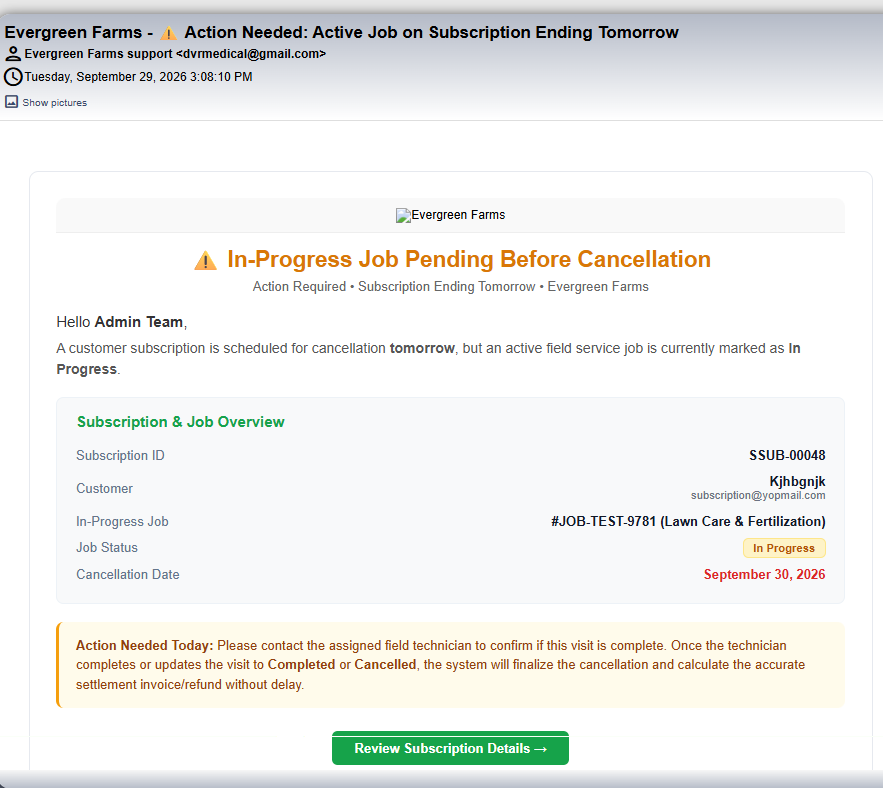
8. what if job is inprogress then do we need to do ( disable the cancel btn and inform admin to complete the job before cancellation or find appropriate solution to disable the cancel for inprogress jobs )
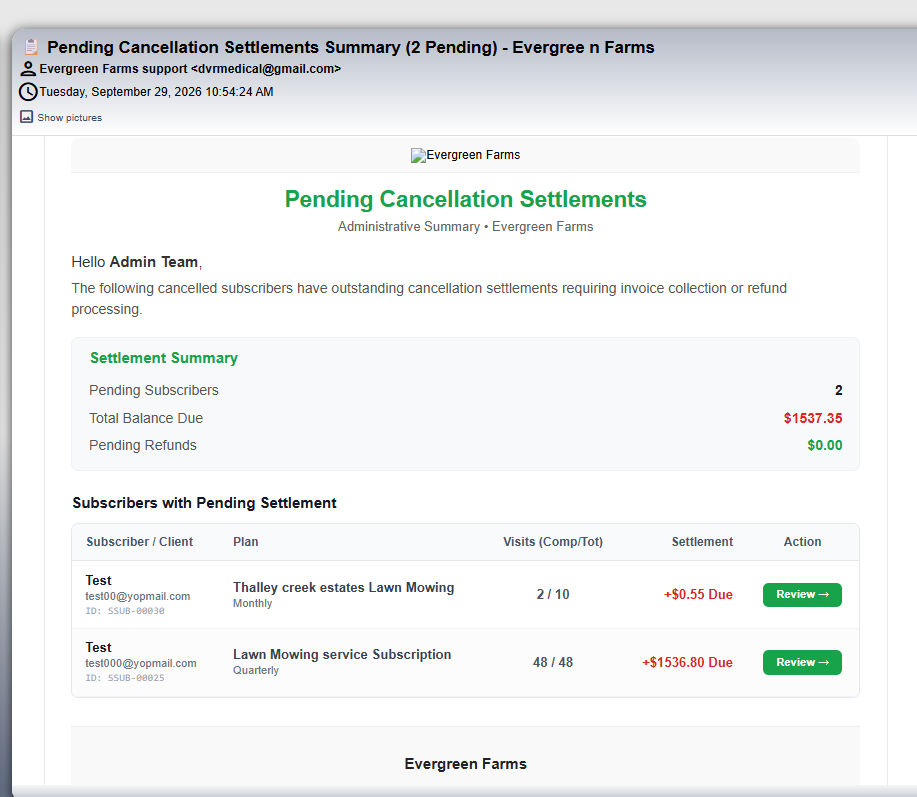
9. send admin a Cancel Settlement Pending email contains all list of subscribers with pending settlement
10. add in dashboard also about the cancel settlement pending invoices scroll
11. customer payment invoice pdf sub id for single payment
12. job schedule to next year sep rather this year in email we got this year, send the jobs group by sql rather than effective schedule.
sol : keep the sep if it is late sign up at the end of the months list and test again
Files
Subtasks
Related issues
Updated by Divya Inapakurthi 7 days ago
~1. buffer time need to discuss with TL…. buffer time is relative to the frequency and sub created and current date~
!image.png
~2. test this checkAndAutoCompleteSubscription with yearly plan → complete all jobs and paymnet check the status in db for complete and stripe for cancel~
~3. keep a banner for subscribers with cancel settlement pendings~
~4. test and fix the fixed week days in company profile~
7. ~job schedule to next year sep rather this year in email we got this year.~
~sol : keep the sep if it is late sign up at the end of the months list and test again, update in monthly visits, subscribers details and email.~
~8. Min Scheduled Jobs Per Day — test whether jobs are shifted to the next day if the max jobs per day is exceeded.~
~11. Send admin a Cancel Settlement Pending email containing the list of subscribers with pending settlement.~
~12. Add a dashboard section for pending cancellation settlement invoices.~
Updated by Divya Inapakurthi 7 days ago
- % Done changed from 0 to 50
1. Buffer Time & Late Signup Sequence: Cutoff threshold shifts late-signup visits to the end of tenure; reordered schedule display (Oct '26 $\rightarrow$ Sep '27) across modal, subscriber details, and confirmation emails. fixed buffer time with preset buffers and allowed max number to end of the next billing and removed the schedule to cancel from the plan and company forms and updated cancelSubscriptionByUser with the latest buffer changes
2. Auto-Complete Subscriptions: checkAndAutoCompleteSubscription marks yearly contracts as completed when all scheduled jobs and payments are 100% fulfilled.
3. Cancel Settlement Pending Ticker: implemented the getSettlementPendingSubscribers and Built a live marquee banner below the In-Progress ticker in Dashboard & Subscribers for immediate settlement visibility.
4. Fixed Weekdays Limit: Enforced strict min 1, max 2 weekday selections in Company Profile with counter badges and validation tooltips.
7. fixed the email to show visits correctly by year wise when late sign up occurs
8. Admin Settlement Digest & Linked Notifications (Req 11 & 12): Created adminCancelSettlementPendingDigest.ejs email digest, linked to Service_Subscription_Cancel_Settlement_Pending in Notification Settings, and built the dashboard settlement section.
Updated by Divya Inapakurthi 6 days ago
9. Update the subscription details page with the cancellation settlement view.
10. What if a job is in progress — what do we need to do? (Disable the Cancel button and inform the admin to complete the job before cancellation, or find an appropriate solution to prevent cancellation for in-progress jobs.) once the buffer time is completed it automaticaly converts to cancelled what if those has in progress ?
- 1. When Admin First Clicks "Cancel" (Day 1) If a job is currently **In Progress**, the system **blocks cancellation right away** and tells the admin:*“Cannot cancel immediately because Job #101 is In Progress right now. Please complete or cancel the job first.”*
- 2. During the Notice Period (Before Cutoff Date) During the notice period (e.g., 14–30 days until billing ends), the customer is still active and entitled to their paid visits. Technicians will continue doing scheduled jobs.
- 3. Advance Reminder (1 Day BEFORE Cutoff Date) 24 Hours Before the Cancellation Date The system checks: *Is there any job currently marked `In Progress` for this subscription?* If yes, it sends a proactive alert to the Admin before the cancellation date:*“⚠️ Reminder: Subscription for John Doe will cancel tomorrow. Job #101 is currently In Progress. Please ensure the technician completes it today so the final bill is ready on time.”*
added a alert messg for immediate cancel in subscribers also
1. modify the placement Max Scheduled Jobs Per Day Capacity, Min Scheduled Jobs Per Day Capacity in company profile.
2. based on the selected dates and weekday... i want this kind of real time explaination to the admin so that admin will never get confuse about the job scheduling way.. and what we will do based on the selected company job related values like min max jobs, lead time all.. can we do that? and interactive model to descide how values effect the jobs with example and consider.. required value and conditions?
5. how stripe handles the insufficient payment recurring.
6. customer payment invoice pdf sub id for single payment
Updated by Divya Inapakurthi 6 days ago
- % Done changed from 50 to 100
1. In-Progress Job Guard on Subscription Cancellation
Goal: Prevent immediate cancellation and financial discrepancies when a subscriber has active jobs currently in progress, while clearly guiding the admin.
Backend Changes:
In
src/services/subscripiton.service.js
: Added in-progress job checks in immediate cancellation flow.
In
src/controllers/jobs-controller.js
: Automatically triggers finalizeScheduledCancellationIfCutoffReached when the last job status is changed to completed.
In
src/cron/subscriptionAutoCancelCron.js
: Added 1-day advance warning notices and graceful deferred cutoff handling if jobs remain in progress.
Frontend Changes:
In
CancelSubscriptionButton.tsx
: Added a warning alert detailing the exact in-progress job ID, disabled the confirm cancel button for immediate cancellation, and directed the admin to update job status or use Schedule to Cancel.
2. Modularized CancelSubscriptionButton Component
Goal: Eliminate massive code duplication (~1,200+ lines) inside subscriber details views.
Implementation:
Extracted cancellation logic, notice buffers, bulk job actions, and settlement calculations into
CancelSubscriptionButton.tsx
.
Refactored
ProductSubscriberDetails.tsx
down from ~1,750 lines to ~540 lines by consuming the reusable component.
3. Job Scheduling Live Explainer & Interactive Simulator
Goal: Help admins visualize and understand exactly how Company Profile scheduling settings generate customer visit dates and handle weekend roll-forwards, capacity limits, and lead-time cutoffs.
Components Created & Integrated:
JobScheduleLiveExplainer.tsx
: Embedded real-time rule cards into the Company Profile UI showing live explanations of grid dates vs weekdays, cutoff lead times, weekend operations, and daily capacities.
JobScheduleSimulatorModal.tsx
: Interactive playground modal with 4 quick scenario presets (Early Month, Mid Month, Late Month Cutoff, Weekend Date) demonstrating the step-by-step logic and generated visit schedule.
CompanyProfile.tsx
: Integrated the explainer component and resolved the isEditing state reference.
Updated by Divya Inapakurthi 6 days ago
- File clipboard-202609291450-mwzab.png clipboard-202609291450-mwzab.png added
- File clipboard-202609291450-p49be.png clipboard-202609291450-p49be.png added
- Status changed from In Progress to Resolved
- % Done changed from 90 to 100