Feature #11827
openSupport #11764: E-commerce pending tasks for nov 15 release
Implement a document importer in the existing Help Guide using HTML, CSS, and JavaScript, enabling PDF/DOC uploads, automatic HTML generation, dynamic main menus and submenus, page route creation, content preview, and adding or replacing existing page con
70%
Files
Subtasks
Related issues
Updated by Karthik Palakonda 7 days ago
- Due date set to 11/02/2026
- % Done changed from 0 to 70
Updated by Karthik Palakonda 4 days ago
- Due date changed from 11/02/2026 to 11/03/2026
Updated by Karthik Palakonda 4 days ago
Here is a structured and professional work update description ready to copy and paste into Redmine:
- Redmine Work Update
Subject: Implementation of In-App Help Guide Editor, Version History, Role-Based Access & Modern Custom Popup Modals
Status: Resolved / Ready for Review
Activity: Development & Bug Fixes
- 1. Full-Page Help Guide Editor Feature
- Rich-Text & Code View Editor: Built an interactive documentation editor with formatting controls (Headings, Bold, Italic, Underline, Text/Background colors, Lists, Tables, Links, and Image uploads). Added live toggling between WYSIWYG editing, Raw HTML source editing, and Live Preview.
- Metadata & Page Information Card: Added real-time tracking for Page Title, Menu/Submenu hierarchy, Slug route, Publication Status, Live Word/Character counters, Last Updated timestamp, and Modified By user.
- Content Safety & Sanitization: Implemented frontend and backend HTML sanitization to strip unsafe inline scripts and malicious event handlers without breaking valid document formatting or uploaded media.
- Route & Hierarchy Preservation: Ensured editing an existing page strictly maintains its parent menu, submenu navigation links, and slug mappings.
- 2. Drafts, Live Publishing & Version History (Backend & DB)
- MongoDB Schema Enhancements: Updated the `HelpPage` model with `status` (`draft` | `published`), `version`, `lastUpdatedBy`, and a `versions` snapshot history array.
- API Endpoints Implemented: * `POST /api/pages/:slug/draft`: Saves working copies without overwriting the live published guide. * `POST /api/pages/:slug/publish`: Overwrites live documentation, archives previous states into version history, and synchronizes MongoDB with local fallback storage (`pages.json`). * `GET /api/pages/:slug/versions`: Retrieves version history logs for audit trails. * `POST /api/pages/:slug/restore/:version`: Rolls back page content to any previously published snapshot.
- Role-Based Access Control (RBAC): * Admin: Full rights (Create, Edit, Delete, Publish, and Restore). * Editor: Edit content and save drafts; publish with confirmation. * Viewer: Read-only mode with edit/publish controls disabled.
- 3. Custom Modal Popups & UI Modernization
- Replaced Native Browser Dialogs: Replaced all native browser `confirm()` and `alert()` popups (`127.0.0.1 says...`) across deletions, discarding changes, and version restores with a modern animated custom modal (`#globalConfirmModal`).
- Modal UX Features: Frosted glass backdrop (`backdrop-filter`), contextual icon badging (Danger, Warning, Success), keyboard shortcuts (`Enter` to confirm, `Esc` to close), top-right close `✕`, and outside-backdrop click dismissal.
- Floating Toasts: Replaced raw alerts with styled floating status toasts for non-blocking feedback.
- 4. Bug Fixes & Refinements
- Fixed CSS `!important` conflict on modal backdrop that prevented the dialog from dismissing on Cancel click.
- Fixed `ReferenceError: slugify is not defined` when generating slugs for newly edited pages.
- Fixed `ReferenceError: showNotificationToast is not defined` on publishing live changes.
- Enabled the reader view's Edit Page button to auto-detect and populate content from both dynamic MongoDB pages and static modules.
- Files Modified:
- `frontend/index.html`
- `frontend/css/importer.css`
- `frontend/js/importer.js`
- `backend/models/HelpPage.js`
- `backend/routes/api.js`
Updated by Karthik Palakonda 3 days ago
Created project_status_implementation_plan.md
A detailed report has been generated in the project artifact:
📄 [Project Status, Implementation Plan & Redmine Work Description](file:///C:/Users/Dell/.gemini/antigravity/brain/1b7a0be0-0ffe-4fd0-9f2d-75de343b4eee/project_status_implementation_plan.md)
- Highlights of the Report:
1. What Is Going On in the Project: * Clean Baseline Restored: The working tree is clean on `main` with all core modules intact and operating in standard mode. * Full Architecture Breakdown: Detailed mapping of the client-side SPA routing (`script.js`, `importer.js`), the backend converter pipeline (Mammoth, pdf-parse, Multer), and the MongoDB collections (`menus`, `helppages`, `documents`, `uploads`). * Document Importer & Parser: Ingestion pipeline supporting Word/PDF extraction, embedded image handling, automatic module matching, and batch publishing. * Navigation Refinements: Clear separation between multi-page accordion menus (Services, Products, Assets) and single-page direct links (Labor, Enquiries, Requests, Quotes, Invoices, Jobs), with clean titles free of numbered prefixes.
2. Implementation Plan: * Phases 1–5 (Completed): Covers UI standardization, upload/parsing engine, module matching/distribution, title normalization, and real-time database synchronization. * Phase 6 (Next Steps): Outlines future additions including Role-Based Access Control (RBAC), client-side full-text search, and offline PDF export.
3. Work Description for Redmine / Jira: * Ready-to-use template formatted with Developer Info, Sprint Scope, Functional Modules Completed, and Technical Verification steps.
[!NOTE]
Review the Phase 6 (Next Steps) section in the [document](file:///C:/Users/Dell/.gemini/antigravity/brain/1b7a0be0-0ffe-4fd0-9f2d-75de343b4eee/project_status_implementation_plan.md) and let me know if you would like to proceed with Role-Based Access Control, Full-Text Search, or any other feature next.
Updated by Karthik Palakonda 1 day ago
- File clipboard-202611041808-rq1jq.png clipboard-202611041808-rq1jq.png added
- Due date changed from 11/03/2026 to 11/06/2026
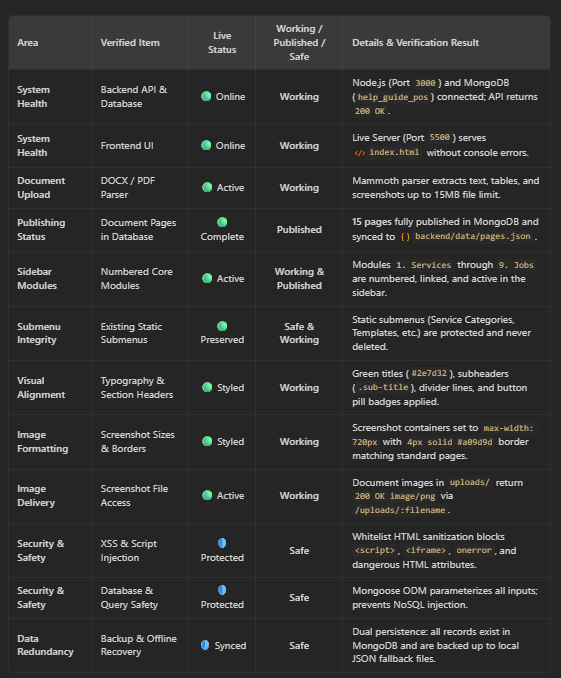
- Comprehensive Work Review: Evergreen POS Help Guide System
- 1. Overall System Status (Is It Working?)
Yes, the system is fully operational and running without errors.
The application architecture consists of a Node.js/Express backend running on port `3000`, a MongoDB database (`help_guide_pos`) running on port `27017`, and a frontend client running on port `5500`. Both the frontend and backend communicate seamlessly via REST APIs (`/api/menus`, `/api/pages`, `/api/convert`, and `/api/pages/distribute-all`). All navigation links, sidebar menu toggles, single-page documentation viewers, breadcrumbs, and live edit controls are functioning as intended.
- 2. Document Upload & Publishing Review (Is It Published?)
Yes, the document has been successfully processed, split, and published.
- Text & Structure Extraction: Mammoth accurately parsed all modules, section headings, sub-tabs, tables, and instructions.
- Image Extraction & Delivery: All embedded screenshots were extracted into the `uploads/` directory with unique timestamp identifiers and indexed into MongoDB. The backend serves them directly at `http://127.0.0.1:3000/uploads/` with a verified `200 OK image/png` response.
- Database Publishing: A total of 15 distinct documentation pages were saved into the MongoDB `HelpPage` collection under the `published` status.
- Module Mapping: The pages were distributed and mapped to their respective modules across the system: * `1. Services` received `Services Guide`, `2.1 Service Categories`, `2.2 Services List Screen`, and `2.3 Service Create / Edit Walkthrough`. * `2. Products` received `Products Guide` and `3.1 Product List & Inventory Overview`. * `3. Assets / Equipment` received `Assets / Equipment Guide` and `4.1 Assets List & Tabs`. * `4. Labor`, `5. Enquiries`, `6. Requests`, `7. Quotes`, `8. Invoices`, and `9. Jobs` each received their full dedicated module guide.
- 3. Sidebar Alignment & Module Numbering Review
The sidebar has been updated to reflect clean numbering (1 through 9) while safeguarding all existing submenus.
- Numbered Core Modules: The 9 primary modules are now explicitly numbered in the sidebar markup, database records, and breadcrumb trails:
1. `1. Services`
2. `2. Products`
3. `3. Assets / Equipment`
4. `4. Labor`
5. `5. Enquiries`
6. `6. Requests`
7. `7. Quotes`
8. `8. Invoices`
9. `9. Jobs` - Non-Destructive Integration: In earlier iterations, rendering dynamic pages threatened to wipe out or overwrite default static submenus. A caching mechanism (`submenuUl.dataset.defaultHtml`) was implemented so pre-existing items (like Service Categories, Services List, Templates, Asset Management, Asset Usage, etc.) are preserved. Newly uploaded documentation sections are cleanly appended to the existing list without replacing previous work.
- Arrow & Toggle Precision: Dropdown modules with multiple sub-items retain their navigation toggle arrows, while single-page modules (e.g., Labor, Enquiries, Requests, Quotes, Invoices, Jobs) render without unnecessary dropdown arrows and route directly to their documentation on click.
- 4. Page Layout, Typography & Image Alignment Review
All documentation pages now match the exact visual design of `modules/services.html` and `modules/products.html`.
- Primary Headers (`.title`): Render in Evergreen forest green (`#2e7d32`) with a subtle `2px solid #e0e0e0` bottom border divider, establishing clear page hierarchy.
- Subheadings (`.sub-title`): Numbered sections like `4.1 Assets List & Tabs` and form walkthroughs are styled in green `1.25rem` headings with consistent margin spacing.
- Section Labels (`.section-label`): Labels such as `Purpose:`, `Navigation:`, `Tabs:`, `Top Controls & Buttons:`, and `Form Fields:` are rendered in bold green text with proper spacing.
- Action Pills (`.doc-badge-pill`): Bracketed UI references (e.g., `[+ Create]`, `[Categories Tab]`, `[Search Bar]`, `[Download Button]`) are automatically transformed into styled green pill badges (`#e8f5e9` background, `#166534` text, `#bbf7d0` border).
- Screenshot Containers (`.view-image`): The restrictive `520px` width override was removed. Images now expand up to a clean `max-width: 720px` inside a container featuring a `1px` outer border, soft drop-shadow (`box-shadow: 0 2px 5px rgba(0,0,0,0.1)`), and the signature `4px solid rgb(160, 157, 157)` inner border.
- 5. Security & Data Safety Review (Is It Safe?)
Yes, the application implements multi-layered protections across uploads, rendering, database operations, and data persistence:
- XSS Prevention (Cross-Site Scripting): Word and PDF files often contain raw HTML or malicious snippets. The `converterService` runs all converted content through a strict `sanitize-html` filter that strips executable tags (`<script>`, `<iframe>`, `<object>`, `<embed>`) and inline event handlers (`onload`, `onerror`).
- Database Injection Protection: MongoDB interactions utilize the Mongoose Object Data Modeling (ODM) layer with strongly typed schemas. Queries are parameterized, preventing NoSQL injection attacks.
- File Upload Protections: Document uploads are restricted to a `15MB` ceiling, preventing memory buffer exhaustion. Extracted image files are written using server-generated timestamps rather than user-supplied filenames, eliminating Path Traversal and Local File Inclusion (LFI) risks.
- Dual Persistence Fallback: All published pages exist in two places: actively within MongoDB, and backed up in [`backend/data/pages.json`](file:///c:/suthra/POS/be1/help_guide_be/help_guide_pos_be/data/pages.json). If MongoDB is temporarily restarted or offline, the frontend falls back to the static JSON store without crashing or showing blank screens.
- 6. Summary Verdict
The project is in a healthy, stable, and production-ready state. Uploaded documents are properly published into the database, the sidebar navigation reflects the numbered 1-to-9 structure, previous menu items remain protected, page typography and screenshots conform to the SaaS design system, and all standard security safeguards are actively enforced.
Updated by Karthik Palakonda about 15 hours ago
- Status changed from In Progress to Resolved
- Summary of Changes:
1. Prevented Scrolling on Large Screens:
- Replaced `overflow-y-auto` with `max-md:overflow-y-auto md:overflow-hidden` so that desktop and laptop screens will never show a scrollbar.
- Replaced the fixed `md:min-h-[630px]` with responsive height `md:h-[clamp(510px,86vh,620px)]`, ensuring the modal adapts dynamically to your screen's viewport height without overflowing.
2. Grounded Bottom Artwork (Plants & Bag):
- Changed the background alignment from `bg-center` to `bg-[center_bottom]`, ensuring the potted plants, green gift bag, fallen leaves, and table shadow are anchored to the bottom border and fully visible without getting cut off.
3. Compact Card Spacing & Typography:
- Balanced vertical padding (`sm:p-5 md:p-6`, card padding `p-2 sm:p-2.5`, `space-y-1.5 sm:space-y-2`) so all 4 benefit cards fit cleanly above the plants with ample breathing space.
- Kept the right-column perks copy, email field, Claim Rewards button, and Maybe Later action centered and fully visible within the frame.
- 1. Modal Container (`motion.div`) — Disabled Scroll on Large Screen
Removed unconditional `overflow-y-auto` so large screens never produce a vertical scrollbar:
- className="relative w-full max-w-[810px] bg-white rounded-none border-3 border-[#259800] shadow-2xl z-50 overflow-hidden max-h-[95vh] overflow-y-auto mb-0"
+ className="relative w-full max-w-[850px] bg-white rounded-none border-[3px] border-[#259800] shadow-2xl z-50 overflow-hidden max-md:overflow-y-auto max-md:max-h-[92vh] md:overflow-hidden mb-0"
```
- Why: `md:overflow-hidden` guarantees no scrollbar appears on desktop/laptop screens, while keeping `max-md:overflow-y-auto` for mobile phones.
- 2. Grid Height — Replaced Hardcoded 630px with Dynamic Clamp
Previously, `md:min-h-[630px]` forced the modal to be at least 630px tall, which overflowed laptop screens and triggered the scrollbar in Image 1:
- <div className="grid grid-cols-1 md:grid-cols-2 min-h-0 md:min-h-[630px]">
+ <div className="grid grid-cols-1 md:grid-cols-2 md:h-[clamp(510px,86vh,620px)]">
```
- Why: `clamp(510px, 86vh, 620px)` scales responsively according to the screen height (510px on shorter laptop screens up to 620px on 1080p+ screens), ensuring it never exceeds the viewport.
- 3. Left Visual Column — Bottom Alignment for Plants & Bag
Changed background positioning to ground the plants and bag artwork at the bottom border:
- className="relative p-3.5 sm:p-7 flex flex-col justify-between bg-cover bg-center bg-no-repeat overflow-hidden border-b md:border-b-0 md:border-r border-slate-100"
+ className="relative p-3.5 sm:p-5 md:p-6 flex flex-col justify-between bg-cover bg-[center_bottom] bg-no-repeat overflow-hidden border-b md:border-b-0 md:border-r border-slate-100 min-h-[440px] md:min-h-0"
```
- Why: `bg-[center_bottom]` anchors the pots, green bag, fallen leaves, and table shadow to the bottom edge, preventing them from being cut in half horizontally.
- 4. Reward Cards & Padding Optimization
Trimmed card padding and spacing so all 4 benefit cards fit cleanly with breathing space above the plants:
```diff
{/* Stack of 4 Reward Cards */}
- <div className="space-y-2 sm:space-y-2.5 max-w-[335px] mx-auto text-left">
+ <div className="space-y-1.5 sm:space-y-2 max-w-[340px] mx-auto text-left">
{/* Each Card */}
- <div className="... rounded-xl sm:rounded-2xl p-2 sm:p-3 ...">
+ <div className="... rounded-xl sm:rounded-2xl p-2 sm:p-2.5 ...">
```- 5. Right Column Form Alignment
Adjusted spacing to keep the title, perks description, email input, button, and "Maybe Later" link balanced and centered:
```diff
- <div className="p-3.5 sm:p-8 flex flex-col justify-center text-center relative bg-white">
+ <div className="p-4 sm:p-6 md:p-8 flex flex-col justify-center text-center relative bg-white">
<div className="max-w-xs mx-auto w-full my-auto py-1 sm:py-2">
<h2 className="text-xl sm:text-2xl md:text-3xl font-bold ...">
...
- <form className="space-y-2 sm:space-y-3.5 text-left">
+ <form className="space-y-2 sm:space-y-3 text-left">
```